



Technical SEO audit evaluates the backend health of your website so Google can crawl, index, and rank your pages without friction. It combines a full website audit of crawlability, site speed, structured data, and mobile usability with a site audit of internal links and URL structure.
Search engines cannot rank pages they cannot access or understand, so fixing these technical gaps often unlocks organic traffic that strong content alone cannot reach. This guide walks through every stage, from your first crawl to long-term monitoring, using the same seo strategy professional auditors rely on.
Table of Contents
- What Is a Technical SEO Audit?
- How a Technical SEO Audit Impacts Google Rankings
- Key Elements of a Winning Technical SEO Audit
- Step-by-Step Technical SEO Audit Process
- Technical SEO Audit Checklist
- Common Technical SEO Issues Found in Every Website Audit
- Advanced Technical SEO Strategies
- Best Practices and Expert Tips
- Common Mistakes to Avoid
- Final Thoughts on Technical Optimization
- Frequently Asked Questions
What Is a Technical SEO Audit?

A technical SEO audit checks the backend of your website. The goal is simple: confirm that Google can access, crawl, and interpret every important page.
This process differs from other parts of search engine optimization. On-page SEO focuses on content and keyword research. Off-page SEO deals with backlinks and external authority, covered in more depth in our off-page SEO audit guide. A technical audit checks the platform itself, covering on page seo elements like meta tags alongside off page seo signals, since search engines reward sites that deliver a fast, clean, crawlable experience regardless of how good the content reads. Together, these three disciplines make up the full picture of modern seo health.
Most site owners assume a website audit only matters for large enterprise sites. In practice, small business sites lose the most organic traffic to technical issues, since they rarely have a developer checking crawl logs or core web vitals against what search engines actually reward. A website seo audit run even once a quarter catches most of these gaps before they compound, and a second website audit six months later confirms the fixes held.
How a Technical SEO Audit Impacts Google Rankings
A solid technical foundation supports every other part of your SEO strategy. Without it, keyword research and content quality cannot fully translate into rankings, since Google may never fully index the pages you worked hardest on.
An audit uncovers these gaps early, before they quietly cap your growth for months.
How a Technical SEO Audit Improves Crawlability and Indexation
A technical SEO audit confirms that crawlers like Googlebot can navigate your site without hitting dead ends. When bots encounter broken links or a confusing URL structure, they fail to index important pages, which makes those pages invisible to search engines no matter how well written they are.
Three checks matter most for crawlability, and each one addresses a different failure point that stops content from ever reaching the index.
- Structured data: An audit verifies your schema markup, which helps Google understand page context and can unlock rich snippets in search results.
- XML sitemaps: It confirms your sitemap is current, correctly formatted, and submitted through Search Console so crawlers have a clear map of every page.
- Robots.txt: An audit checks this file line by line, since one misplaced rule can accidentally block crawlers from an entire section of your site.
How a Technical SEO Audit Enhances Website Performance
Page loading speed and page speed shape both user experience and google rankings directly. Slow pages drive up bounce rates, and that signals a poor experience to search engines well before any manual review happens.
A technical audit pinpoints exactly what slows a page down instead of leaving you guessing.
- Core Web Vitals: The audit measures your site against Largest Contentful Paint, First Input Delay, and Cumulative Layout Shift, the three metrics Google uses to judge real-world speed.
- Image optimization: It flags oversized image files that compress or resize without losing visible quality, often the single fastest fix available.
- Mobile-friendliness: The audit confirms your site responds correctly on phones, since Google indexes the mobile version of your pages first.
How a Technical SEO Audit Fixes Hidden Technical Issues
Hidden errors erode search visibility quietly, often for months before anyone notices the traffic decline. A website audit surfaces these technical issues so you can fix them on your own timeline instead of reacting to a ranking drop.
- Broken links that interrupt navigation and waste crawl budget on dead ends.
- Duplicate content that confuses Google about which version deserves to rank.
- Missing meta tags and meta descriptions that leave page relevance unclear to both users and crawlers.
Key Elements of a Winning Technical SEO Audit
A full site audit covers several distinct categories, and skipping even one leaves a blind spot in your technical health.
- Crawlability and indexation audit: Checks robots.txt, your XML sitemap, and any recurring indexing errors that keep pages out of search results.
- Site structure audit: Reviews URL structure, internal links, and overall navigation to confirm link equity reaches your most important pages.
- Website performance SEO: Measures Core Web Vitals to judge loading speed, responsiveness, and visual stability across your entire site.
- Mobile-friendliness audit: Confirms buttons, text, and layout stay usable on small screens, since most users now browse exclusively on mobile.
- Technical optimization audit: Verifies HTTPS, checks response headers, and validates canonical tags and structured data markup as part of your site’s core technical setup.
- Error and redirect analysis: Flags 404 errors, redirect chains, and any orphan pages that no longer connect to your site structure.
Step-by-Step Technical SEO Audit Process
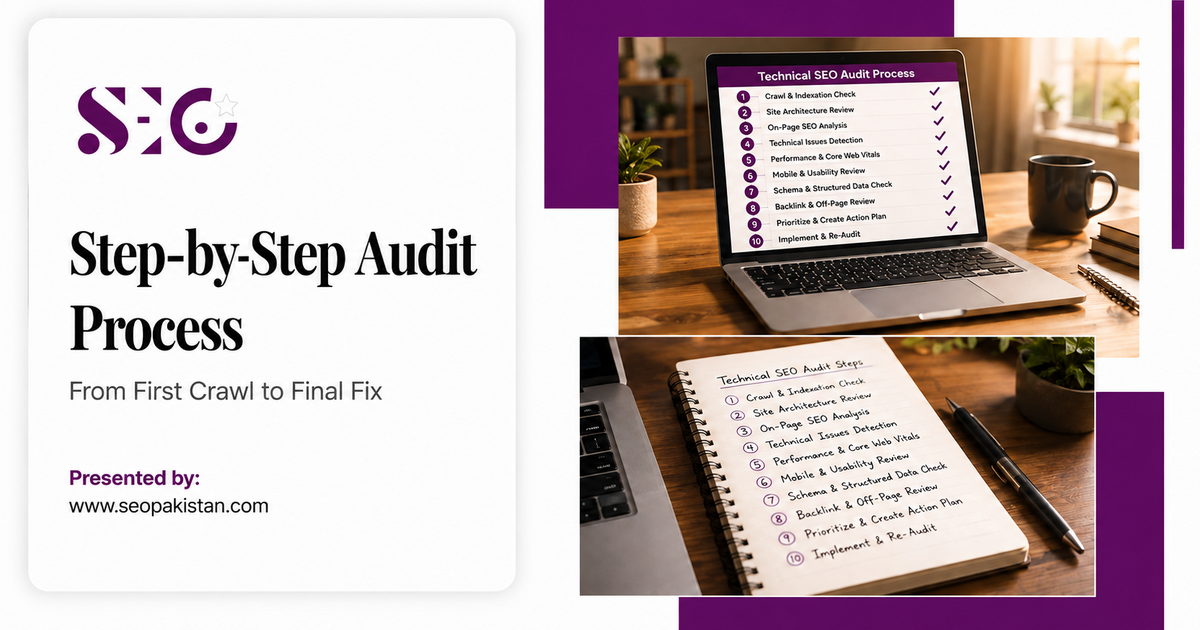
Following a structured sequence keeps a full site audit from turning into a scattered checklist you never finish. Each step below builds on the data from the one before it.
Step 1: Crawl the Entire Website With an SEO Audit Tool
Crawling simulates how Googlebot sees your pages, which surfaces structural problems before they cost you rankings. Several tools handle this well, and our free SEO audit tool guide breaks down which option fits different budgets. Many platforms offer a free trial before moving to paid plans, and most let you cancel anytime if the workflow does not fit your team.
- Select a crawler: Screaming Frog, Sitebulb, or Ahrefs Site Audit all work well; see our popular SEO tools roundup for a full comparison.
- Configure the crawl: Set the tool to mimic Googlebot’s behavior for the most accurate results.
- Run and export: Scan the entire website, then export a full seo audit report listing every web page, status code, and technical element for review.
Step 2: Analyze Indexation With Google Search Console
Comparing crawled pages against indexed pages reveals where important content goes missing from search results. This step catches both under-indexing and index bloat from low-value pages.
- Check indexed pages: Use Google Search Console to confirm how many pages Google has actually indexed.
- Cross-reference: Compare that number against your crawl data to spot the gap.
- Flag discrepancies: Look for important pages missing from the index or thin pages that should not be indexed at all.
Step 3: Complete a Full Site Structure Audit
A logical structure helps both users and crawlers move through your site efficiently. This step confirms that authority flows toward the pages you most want to rank.
- Map the hierarchy: Visualize how pages connect using your crawl tool’s site structure view.
- Check click depth: Confirm your most important pages sit within three clicks of the homepage.
- Review internal links: Verify pages link to each other with descriptive, relevant anchor text.
Step 4: Check Website Performance and Core Web Vitals
Core Web Vitals now carry real ranking weight, so this step deserves focused attention rather than a quick glance. Slow pages frustrate users long before Google penalizes them for it.
Run your key pages through PageSpeed Insights and note any page scoring below 50 on mobile, since that threshold usually signals a real user experience problem worth fixing first.
Step 5: Review On-Page Technical Elements
Canonical tags and structured data shape how Google interprets individual pages beyond raw content. This step prevents the duplicate content issues that silently split ranking signals across near-identical URLs.
- Inspect canonical tags: Confirm each one points to the correct master version of a page.
- Check hreflang tags: For multi-language sites, verify the right version reaches the right regional audience.
- Validate structured data: Run Google’s Rich Results Test to catch schema errors before they cost you a rich snippet.
Step 6: Fix Technical SEO Issues by Priority
A long list of issues means nothing without a plan to act on it. Sorting by impact keeps the audit from becoming a report nobody implements.
- Build a priority list: Sort issues into high, medium, and low impact, treating critical issues on a high-traffic category page very differently from a minor tag missing on a single low-traffic page.
- Fix critical errors first: Broken links, bad redirects, and major indexing problems come before smaller polish items.
- Work through systematically: Tackle the list in order rather than jumping between unrelated fixes.
Step 7: Monitor Technical Health With Recurring Audits
A one-time website audit loses value within months as your site changes, since new server errors, indexing errors, and content updates appear constantly. Ongoing monitoring through automated audits catches these new problems while they stay small and easy to fix.
- Schedule recurring audits: Set up weekly or monthly automated crawls to track your technical health over time.
- Set up alerts: Configure notifications for sudden spikes in 404s or server errors.
- Track Core Web Vitals: Watch these scores monthly to measure progress instead of guessing whether fixes worked.
Technical SEO Audit Checklist for Every Website
| Category | Key Checks | Recommended Tools | Priority Level | Impact on Rankings |
| Crawlability | robots.txt, crawl errors, orphan pages | Screaming Frog, our popular web crawlers guide | High | Blocks indexing entirely if broken |
| Indexation | XML sitemaps, noindex tags, canonical tags | Google Search Console | High | Determines which pages can rank at all |
| Performance | Core Web Vitals, page speed | PageSpeed Insights | High | Direct Google ranking factor |
| Structure | URL structure, internal links | Ahrefs, Ahrefs vs Semrush | Medium | Shapes how link equity flows |
| Security | HTTPS, security headers | Browser dev tools | Medium | Trust signal for users and Google |
Common Technical SEO Issues Found in Every Website Audit
The same handful of problems show up across most audit reports, regardless of industry or site size. Knowing what to expect speeds up diagnosis considerably.
Broken Links and 404 Errors
Broken links create dead ends for both users and crawlers, wasting crawl budgets that could go toward valuable pages. When Googlebot hits enough dead ends, it slows how often it revisits your site.
Slow Page Speed and Load Speed Issues
Large image files, render-blocking JavaScript, and unoptimized code remain the most common culprits behind slow pages. Run PageSpeed Insights, then compress images, minify CSS and JavaScript, and enable browser caching to close the gap.
Duplicate Content Across Multiple URLs
Identical or near-identical content across multiple URLs splits ranking signals and confuses Google about which version to show. This often happens by accident through printer-friendly pages or tracking parameters appended to a single page.
Canonical tags solve most cases by pointing Google to the master version, while 301 redirects work better when you want to fully consolidate two pages into one.
Missing or Unoptimized Alt Text
Alt text describes an image for both screen readers and Google’s image crawlers. Every meaningful image needs descriptive, natural alt text, since missing tags hurt accessibility and leave a small but real ranking opportunity on the table.
Improper Canonical Tags
Incorrect canonical tags send Google mixed signals about which page deserves to rank. A technical audit catches these mismatches before they quietly dilute your best content.
Advanced Technical SEO Strategies

Basic audits cover the fundamentals well. These advanced techniques separate sites that dominate their category from sites that simply avoid obvious errors.
- Crawl budget optimization: Block low-value pages like expired promotions or internal search results in robots.txt so crawlers spend their limited budget on pages that matter.
- JavaScript SEO: Use server-side or dynamic rendering for JavaScript-heavy sites, since Googlebot can still struggle to render some dynamic content correctly.
- Log file analysis: Review server logs to see exactly which pages Googlebot visits most, which reveals crawl patterns no crawler simulation can show you.
- Structured data optimization: Add schema for FAQPage, HowTo, or Product markup to earn rich snippets that stand out in crowded search results.
- International SEO with hreflang: Implement hreflang tags correctly so the right regional page reaches the right audience without triggering duplicate content flags.
- Edge SEO: Deploy redirects, robots.txt updates, or security headers directly through your CDN, skipping the usual developer queue for fast-moving fixes.
- AI search visibility: Search behavior now includes AI Overviews and conversational answers, so structuring content with clear entities and FAQ schema, as covered in our generative engine optimization guide, extends technical SEO into ai visibility across AI platforms and AI engines, not just classic search results.
Best Practices and Expert Tips for Technical SEO Audits
A few habits separate teams that fix issues once from teams that keep them fixed long term.
- Re-run a full site audit every quarter at minimum, and monthly for large or fast-changing sites.
- Document every fix with a before-and-after screenshot, since this makes the next audit faster and proves ROI to stakeholders.
- Treat Core Web Vitals as a rolling metric, not a one-time pass or fail, since real user data shifts with traffic and content changes.
- Assign one owner per audit category so issues do not fall through the cracks between marketing and development teams.
- Cross-check findings from at least two SEO tools before reporting a critical error, since single-tool false positives waste developer time on non-issues.
Common Mistakes to Avoid During a Technical SEO Audit
Even experienced teams fall into a few predictable traps that undercut an otherwise solid technical SEO audit.
- Treating the audit as a one-time project instead of a recurring process that catches new issues early.
- Fixing low-impact issues first because they look easy, while critical indexing problems sit untouched for weeks.
- Ignoring mobile results because desktop numbers look fine, even though Google indexes the mobile version first.
- Skipping verification after a fix, which leaves teams unsure whether a change actually resolved the underlying problem.
Final Thoughts on Technical Optimization
A technical SEO audit remains the most reliable way to strengthen your website’s foundation and stay competitive. A complete website audit uncovers the specific issues quietly capping your search traffic, from crawl errors to slow-loading pages.
Strong site structure combined with steady attention to website performance SEO keeps your rankings stable as Google’s algorithms continue to shift. Regular audits of speed, mobile accessibility, and security reveal growth opportunities and help you avoid penalties before they happen.
Ready to strengthen your technical foundation? The team at SEOPakistan.com runs a full website seo audit that pinpoints exactly where your site loses rankings to competing search engines, then builds a prioritized fix list your developers can act on immediately.
Frequently Asked Questions
What is a technical SEO audit?
A technical SEO audit is a full evaluation of your website’s technical health, confirming Google can crawl, index, and render your pages correctly. This website audit identifies issues like broken links, slow page speed, and poor mobile usability that quietly limit organic search performance.
What does a technical SEO audit include?
A thorough SEO audit reviews site architecture, crawl and indexing errors, page load speed, mobile accessibility, HTTPS security, and the quality of your sitemap and robots.txt file. Together, these checks give a complete picture of technical health beyond what any single tool reports on its own.
How often should you run a technical SEO audit?
Most websites benefit from a full technical SEO audit every six months to catch new issues and adapt to algorithm changes. Larger or frequently updated sites should run monthly checks instead, since new content and structural changes introduce new technical risk more often.
Which tools work best for a technical SEO audit?
Google Search Console and PageSpeed Insights offer free, direct diagnostics straight from Google. For deeper analysis, an online SEO audit tool like Screaming Frog handles crawling, while all-in-one platforms such as Ahrefs or Semrush combine site audit, keyword research, and backlink data in one place.
Why does website performance SEO matter for rankings?
Page load speed and mobile responsiveness both function as direct Google ranking factors, not just user experience nice-to-haves. A slow or poorly optimized site drives up bounce rates and lowers engagement, which signals to Google that the page may not deserve a top position.
Can I run a technical SEO audit myself, or do I need an agency?
You can run a basic website audit yourself using free tools like Google Search Console and PageSpeed Insights, and this catches many common issues without any cost. Larger sites, or ones facing an unexplained traffic drop, usually benefit from a professional site audit that digs into log files, JavaScript rendering, and crawl budget in more depth than free tools cover.